Can you ship a story without sitting down?
All of it. Tracker to pull request, on your phone.
PRCHD runs Claude Code, Codex and Grok on a computer you own. From your phone you pick up the story, start a workspace, read the agent's plan and approve it, review the diff, run the tests and open the pull request.
A phone for the developer. Slack for everyone else.
Reads as "perched". A bird on a branch, watching your code.
Chat was never the hard part
Talking to a coding agent from your phone is easy now. Delivering a story from it isn't.
Between the ticket and the merge there's a branch to cut, a plan to read and approve, a diff to review, tests to run and a pull request to write. Every one of those steps lives at the desk the agent runs on. So the agent finishes in twenty minutes, and the story waits until you sit down.
PRCHD puts the whole job on your phone. The agent and the code stay where they are.
Is it for developers or for teams?
Both, from the same install. The host has no modes: every capability is on every host, and what you configure decides its shape. Pair a phone, bind a Slack channel, or both.
| Personal host: the developer lane | Team host: the team lane | |
|---|---|---|
| The job | Deliver a story, from the tracker to a pull request | Answer the team's questions, and run recipes when something happens |
| Runs on | Your own computer | A shared computer that stays awake |
| You reach it from | Your phone or iPad | A Slack channel |
| Who gets in | Your tailnet, plus a per-device token | Members of the bound channel |
| Needs | Tailscale and the app | A Slack app and two tokens. No Tailscale, no phone |
The developer lane
One story, start to finish
Here's a story delivered from the phone, in the order you'd do it. Each step is a screen in the app. The work happens on your computer.
- Pick up the story. Work items lists your stories from Jira, Linear, Shortcut, ClickUp or Trello, read by the agent through its own tools. GitHub issues are built in. Tap one and press Start.
- Start a workspace. The story arrives as the agent's brief. The first message, branch, agent (Claude Code, Codex or Grok), model, reasoning effort and mode are all editable before anything runs. Attach the screenshot from the bug report, or a PDF. Start creates a workspace: one git worktree, one branch and one live agent session, with its own base commit, ports and working directory. Run several stories side by side. They only meet at merge time.
- Read the plan. In Plan mode the agent reads the code, proposes, and changes nothing on disk. The plan arrives on your phone as a card. Push back in the chat until it's the plan you'd have written.
- Approve it. One tap on Start working moves the chat from Plan to Work, and the agent builds what you approved: it writes, runs and commits, with no permission prompts to wait on. Steer it or stop it mid-turn if it drifts.
- Review the work. The real diff, syntax-highlighted. Compare from the fork point or from the last commit. Select any span, attach a note, send it back to the agent. Specs get reviewed exactly like code.
- Check it runs. Tap to run tests, lint or build, with pass or fail inline. A real terminal, streamed to your phone. The dev server opens on your phone over your own network.
-
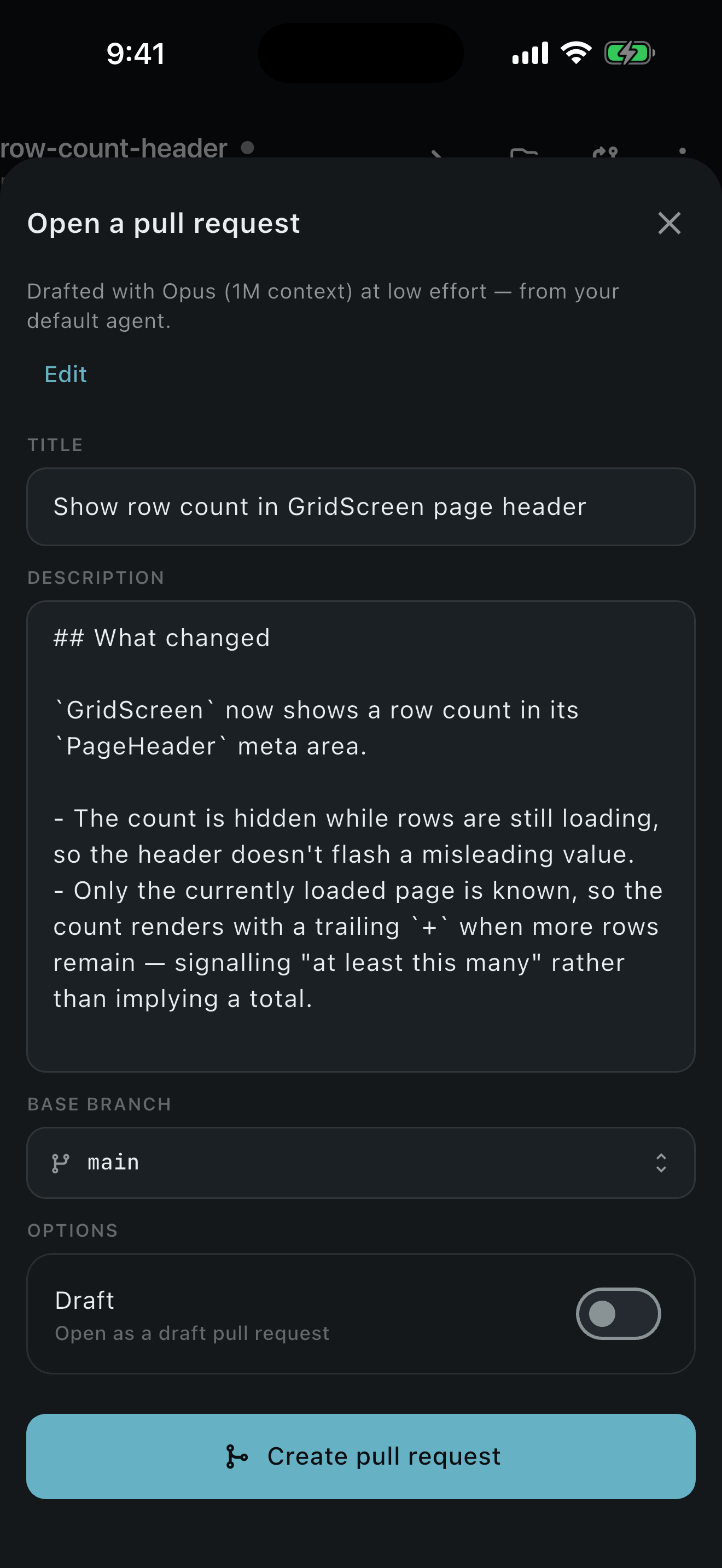
Open the pull request. The agent drafts the commit message and the pull request, and you edit
both. Push and open it. A story that started as a GitHub issue carries its
Closes #Nwith it. Or merge locally and close the workspace. A merge conflict never destroys work: the workspace waits for you.
-
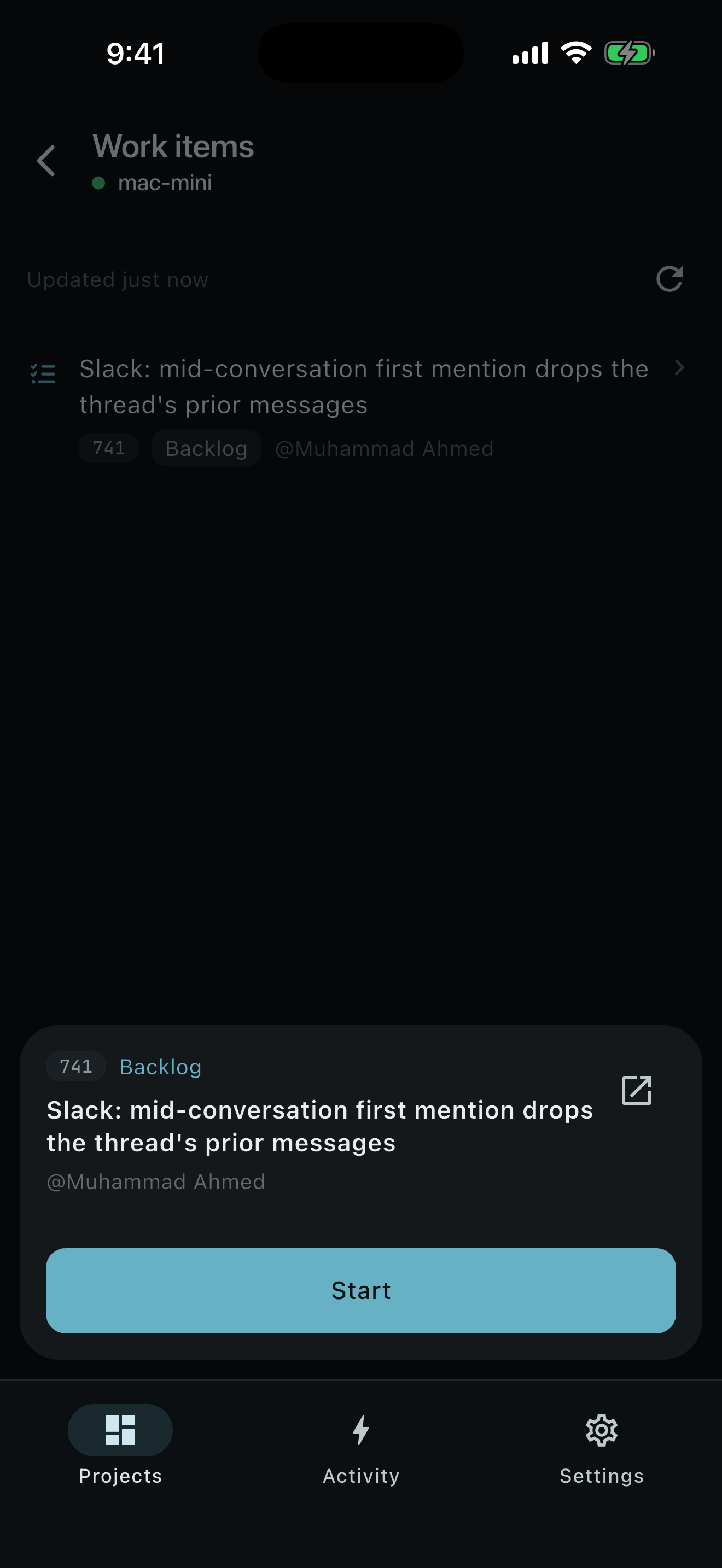
1. Pick up the story -
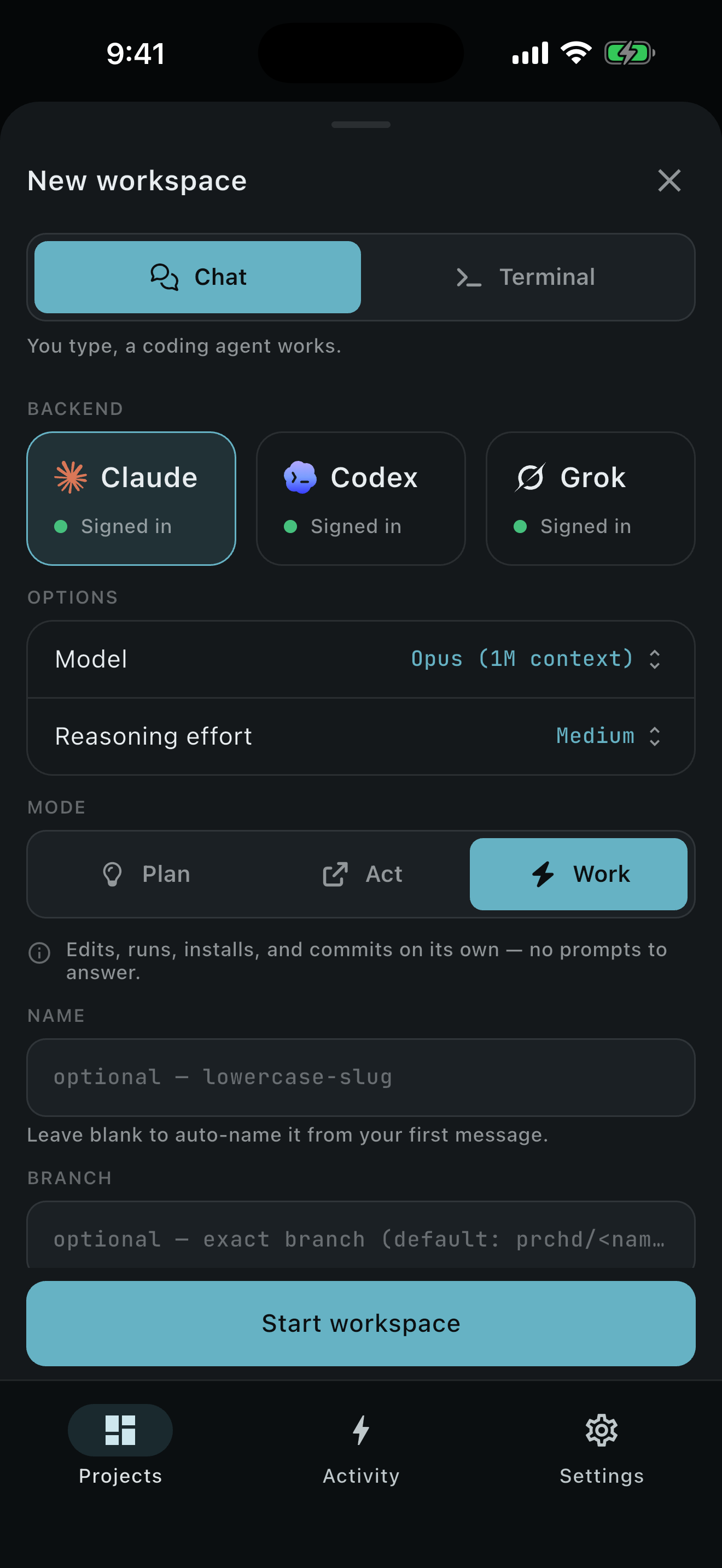
2. Start a workspace -
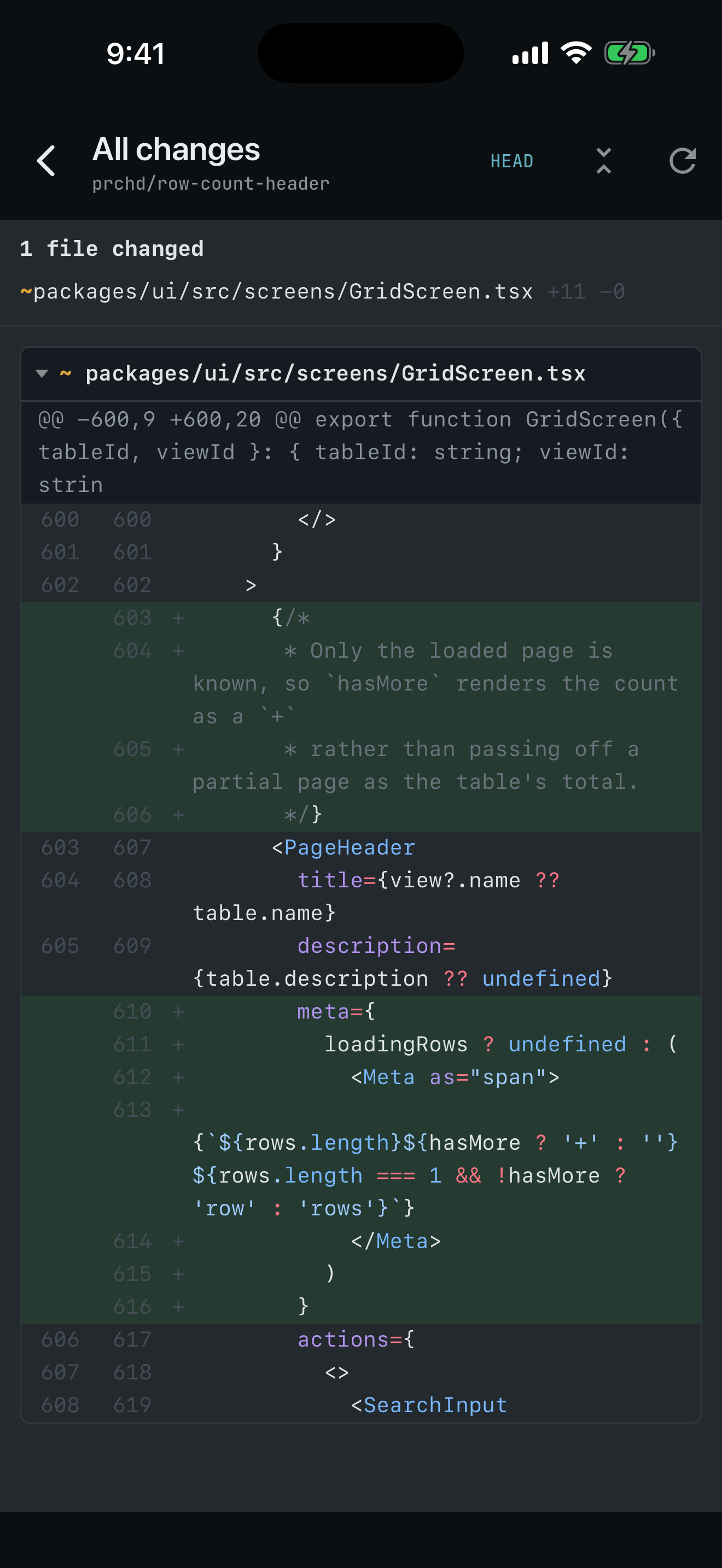
5. Review the work -
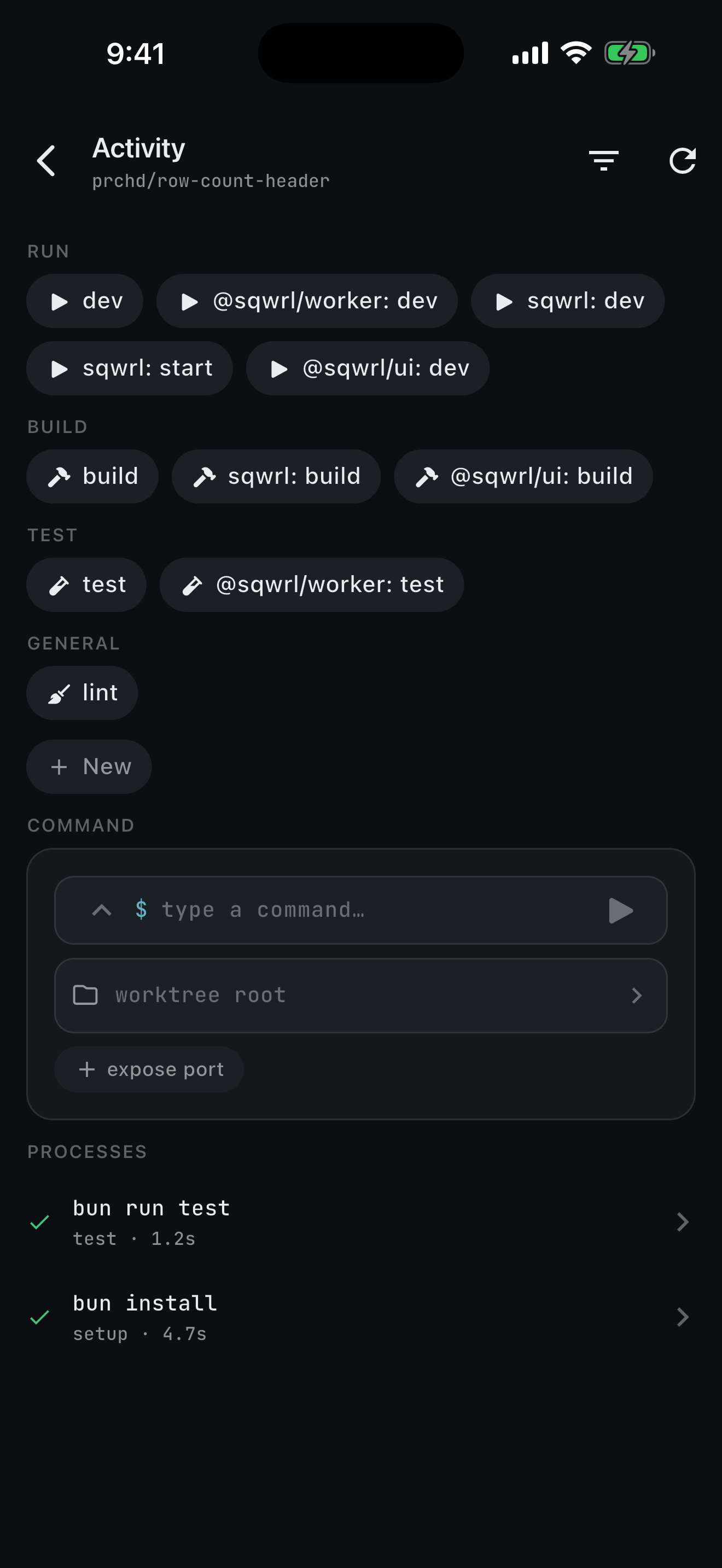
6. Check it runs
The agent wrote the code. You made every call around it, and none of them needed a desk.
Modes, chosen before the run. Every chat runs in one of three:
- Plan proposes and changes nothing.
- Act reads and investigates, and writes nothing to disk.
- Work writes, runs and commits.
Decide the autonomy up front, and unattended work can finish with nobody watching.
Also in the developer lane
- PR review by an agent. PRCHD checks the pull request out in a throwaway worktree, an agent runs and tests it, and one GitHub review lands with a verdict and inline comments anchored to real lines.
- Several computers paired to one phone. Face ID lock. Notifications that carry no content. Split panes on iPad.
The team lane
The codebase, in a Slack channel
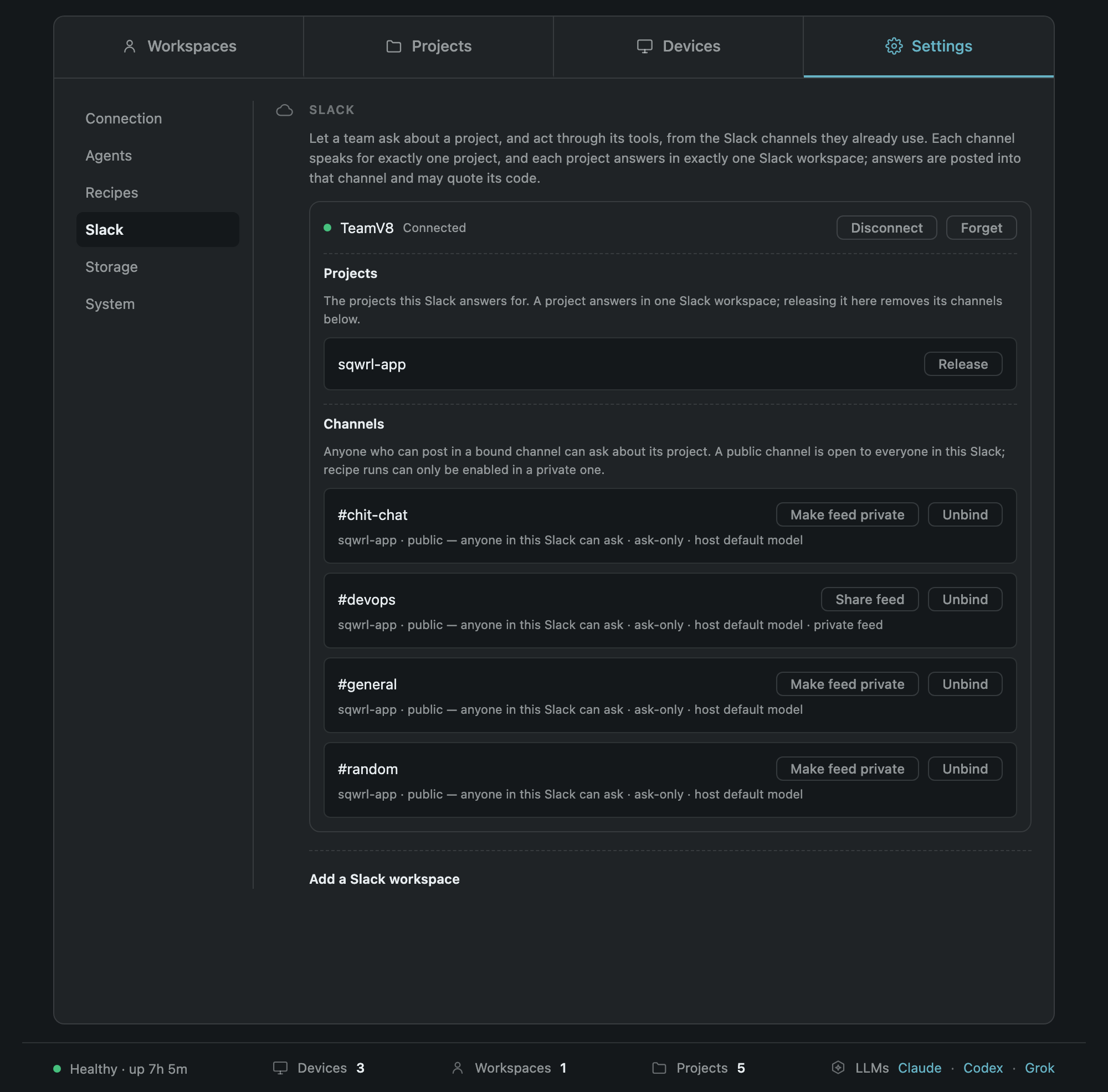
Install PRCHD once on a computer the team already owns and bind a Slack channel to a project. Product, support and QA ask the code directly, and the engineers they would have interrupted keep working. Nobody creates an account, installs an app or pairs a phone. Joining the channel is the whole onboarding.
Ask. Anyone in a bound channel mentions @PRCHD with the question they'd have taken to an
engineer. Before the session opens, the checkout is fast-forwarded from origin. The agent reads the real code in Act
mode, uses the team's own tools, and answers in the thread. Then the answer signs itself:
answered from payments-api @ 4f2c9ab (main) · Act modeThe signature names the repository, the commit and the mode, so anyone reading the thread later knows exactly what the answer was based on.
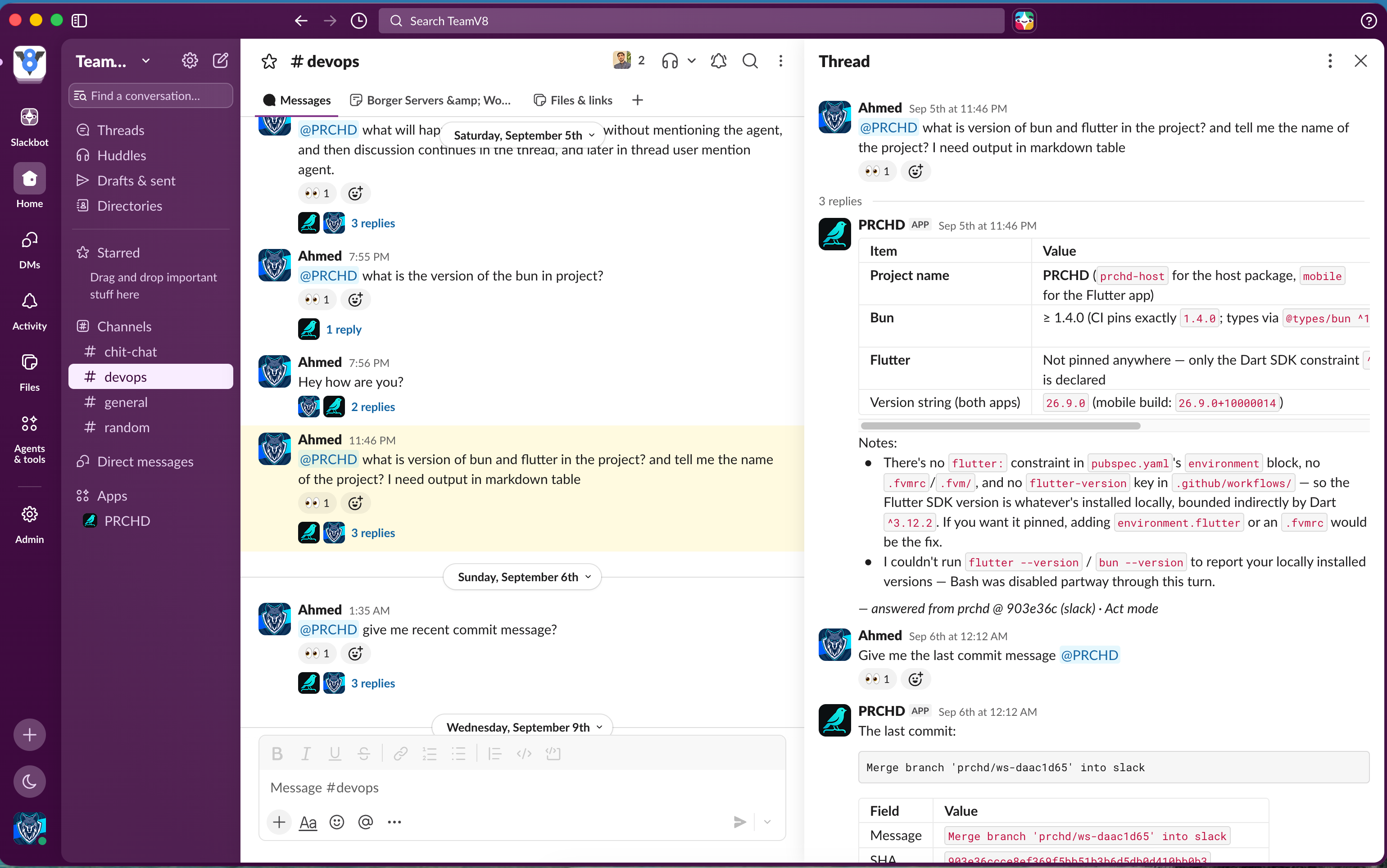
A follow-up in the thread continues the same session, with every human message posted since the agent last replied. Act mode is structural here, not a setting: a question can't be turned into something that writes to the repository.
Run. /prchd run <recipe>: <input> starts real work, and only in private
channels the operator has enabled for it. Public channels can never run anything. The run announces itself, threads
its result, and leaves a branch to review.
React. When something happens elsewhere (a crash, a red build, a ticket moving to Ready) a webhook trigger turns it into a run, under the posture the operator already chose. A trigger can't name its own prompt, mode or target, so whoever sends the webhook can't choose what runs.
Recipes. A recipe is a prompt with a fixed posture: a fresh worktree or read-only in the project root, which mode, which model, what becomes of the result, and whether the run gets the project's tools at all. One recipe can fire four ways: on demand, on a schedule, from Slack, or from a webhook.
Automations. Scheduled runs never stack: a nightly suite that overruns its next slot doesn't start a second copy. A missed window catches up once, not once for every hour the machine slept. A run can ask when it last succeeded, so "since last time" means something.
Triggers. Webhooks from GitHub, Sentry, Stripe, ClickUp or anything that can send a request. The public URL lives on PRCHD's service, which seals each delivery to the host's own key and stores only ciphertext. The host collects deliveries outbound, so nothing on it listens on the internet.
A small verifier you write decides whether each delivery is rejected, ignored or run. It runs in its own process with
a two-second budget, and gets its input on stdin, because command-line arguments are readable by anyone running
ps. Failed runs wait in a dead-letter queue for replay.
PRCHD ships no vendor integrations to maintain. Any tool your agent can already use works here on day one.
Governance
- The channel is the whole grant. Membership is the entire access list. Remove someone from the channel and they're removed from the product. No accounts, no role matrix, no seats.
- A channel that turns public loses its right to run. Channels shared with other companies are refused. Bindings are re-checked on reconnect, never assumed.
- One computer can serve several Slack workspaces, kept apart in the schema: every row is keyed by workspace, and a project answers in exactly one of them because the schema can't express anything else.
- Replies wait in a durable outbox through rate limits and restarts. Questions older than fifteen minutes when the host comes back get told why they went unanswered, instead of starting a surprise run.
- Every interaction leaves an audit event with no content in it.
The thesis loop, step by step
Some of it runs in PRCHD today. Here's which parts.
| Step in the thesis | Today in PRCHD |
|---|---|
| 1. An agent notices a problem in crash reports or analytics | Runs. Webhook triggers (Sentry, GitHub, anything) and scheduled automations. The agent reads those tools through its own MCP connections |
| 2. It proposes a feature in the tracker | Partly. A recipe can file a story through the tracker's tools. What it proposes is whatever the recipe asks for |
| 3. It shares the link in Slack | Runs. A built-in Slack notifier: post, message a person, edit, upload |
| 4. A product owner approves | Partly. Approval is a human action that fires a trigger: a card moved to Ready for Dev, an issue labelled agent. In the developer lane, switching a plan from Plan to Work |
| 5. An agent splits the work into tasks | Not yet. One trigger runs one recipe: one task, one worktree |
| 6. Agents build on isolated branches | Runs. A fresh worktree per run, kept when there's work to review, kept on failure as evidence |
| 7. A pull request opens | Partly. Drafted and opened from the phone. Unattended only when the recipe tells the agent to |
| 8. A reviewer agent and a senior engineer review it | Runs on demand. The reviewer agent posts one anchored GitHub review. The engineer reviews the diff on their phone. Reviewing automatically on open takes a recipe and a webhook |
| 9. A QA loop | Partly. The tools exist: commands, a terminal, the running app over your network, a browser the agent drives. The fail, fix, re-review loop isn't orchestrated yet |
| 10. Delivered | Partly. Commit, push and merge on the host. Merging the pull request on GitHub is a step for a person |
Four steps run today with no glue. The rest is a prompt away or on the list.
One complaint, four desks
-
Triage. A crash lands in Sentry. A trigger fires a triage recipe: a story is filed in the tracker
with the suspect commit, and a summary goes to
#incidents. - Approval. The product owner drags the card to Ready for Dev. That drag is the approval. A recipe writes a failing test, then the fix, on a fresh branch.
- Review. An engineer opens the diff on their phone, leaves a note on one line, and the agent fixes it.
- Land. Tests pass. Commit, push, pull request.
The product owner started engineering work by moving a card. The engineer showed up for the first time to review finished work.
Architecture
The code and the agents stay on the host. The phone connects to it directly. Slack and webhooks reach it through connections the host opens itself.
The host, a menu-bar app:
-
A small Rust shell (Tauri) supervises a TypeScript core compiled into one binary with Bun. All product logic lives
in the core. No Node runtime and no
node_modulesship. - The dashboard listens on loopback only. The phone API (gRPC) binds only to the tailnet address, never the open internet.
- Storage is SQLite with an append-only event log as the source of truth. Every screen is a replayable projection of it.
The agents: Claude Code, Codex and Grok, each through its native SDK or protocol, normalised into one event schema and one capability descriptor. Product code branches on capabilities, never on which vendor is running.
The mobile app: Flutter on iPhone, iPad and Android, speaking one typed gRPC contract: 116 calls, shared by TypeScript and Dart.
The service: Bun, Hono and Turso on Fly.io. It has three jobs: host identity, push relay, and sealed webhook storage (ECIES over P-256, with HKDF-SHA256 and AES-256-GCM).
The service stores no project, no chat, no prompt, no source code and no notification body.
The trust model, plainly
- The phone talks directly to your computer over your own Tailscale network.
- Pairing is a single-use QR code. The phone pins the host's key. The host keeps only a hash of the phone's token. Revoke a device and its live streams end with it.
- Slack and GitHub credentials stay in the Keychain and the GitHub CLI. PRCHD never resells model access.
- One caveat: your agent still talks to its model provider. PRCHD's promise is narrower and more useful. The repository stays on a computer you own, and PRCHD adds no new place for your code to go.
Decisions
Why keep the agent on your own computer, and not in a cloud sandbox? #
Because a cloud sandbox has your code. Keeping the agent home means the repository, the credentials and the toolchain stay where they already are, and PRCHD adds no new copy. The cost: one of your computers has to be on.
Why does the service store nothing? #
Because it can't leak what it never had. It gives up a lot for that: a notification says that something happened, not what, so you open the app to find out. And a webhook waits to be collected, because the host fetches sealed deliveries outbound instead of listening.
Why decide autonomy before the run? #
Because a permission prompt at minute twelve means nobody's watching at minute thirteen. Plan, Act or Work is chosen up front, and each agent maps it onto its own sandbox. The cost: the mode has to be right at the start. Too little and the run stops at a plan. Choose Work and you've agreed to everything the sandbox allows.
Why read the tracker through the agent, and not build a Jira integration? #
Because the agent already reaches the tracker. Work items are two built-in recipes: the prompt names your tracker, and the agent reads it through the MCP servers it already has. PRCHD holds no tracker credentials and no tracker code, so any tracker with an MCP server works the day you name it. The cost: setup is a prompt you write, not a board you pick, and starting a story doesn't mark it started in the tracker.
Why is the Slack channel the whole access list? #
Because a role matrix is a second source of truth, and second sources of truth drift. The cost: everyone in a bound channel has the same reach. Two people who need different reach need different channels.
Why TypeScript compiled with Bun, inside a Tauri shell? #
Because the agent SDKs PRCHD drives are TypeScript, and Bun compiles the whole core into one signed binary. The Rust shell stays tiny. The installer is 32 MB. The cost: Bun's runtime isn't Node's, and some of PRCHD's worst bugs lived in that gap.
Why not the Mac App Store? #
Because the host has to run agents, git and dev servers, and the App Sandbox exists to prevent exactly that. PRCHD ships as a signed, notarised download with over-the-air updates from CI. The cost: no store listing for the host, and notarisation becomes my problem.
Why preserve conflicts instead of resolving them? #
An agent that "fixes" a merge conflict you never saw is a liability. Conflicts are kept, never silently resolved, and the workspace waits for a human.
Technology choices
| Layer | Choice | Why |
|---|---|---|
| Desktop shell | Tauri 2 (Rust) | A native menu-bar app, signed, notarised and self-updating, at a fraction of Electron's weight |
| Host core | TypeScript, compiled with Bun | The same language as the agent SDKs. One binary, no Node runtime |
| Phone to computer | gRPC: nice-grpc on the host, grpc-dart on the phone | One typed contract across TypeScript and Dart, with streaming for live transcripts and a real terminal |
| Local storage | SQLite (bun:sqlite) with Drizzle ORM | An append-only event log as the source of truth. Nothing to install or operate |
| Local dashboard | Hono and htmx | Server-rendered, loopback-only, no front-end build for an admin surface |
| Diff rendering | Shiki, on the host | Highlighting happens on the powerful machine. The phone renders finished HTML |
| Agents | Claude Agent SDK · Codex SDK and app-server · Agent Client Protocol for Grok | Each vendor through its native interface, normalised into one event schema |
| Mobile | Flutter, Riverpod 3, GoRouter, Hive CE, xterm | One codebase for iPhone, iPad and Android, with an offline cache and a real terminal |
| Network | Tailscale (WireGuard) | Direct, encrypted phone-to-computer transport with no port open to the internet |
| Cloud service | Bun, Hono, Drizzle and Turso on Fly.io | Small and cheap for three jobs. It never stores content, so it never needs to be big |
| Browser for agents | Playwright driving the installed Chrome | Agents check the running app without shipping a browser |
| Team surface | Slack Socket Mode | Outbound only, so the host never listens on the public internet |
The numbers
From the repositories, as of 30 September 2026.
- 1,089 commits in 96 days, from 26 June to 30 September 2026. One author.
- About 242,000 hand-written lines across host, mobile app, service and website, not counting generated code. 39% of the product code is tests: about 3,480 of them.
- Three agents, three platforms, one contract of 116 gRPC calls.
- Seven releases, from 26.8.1 in August to 26.9.4 on 30 September.
- Built with itself. From 13 July, PRCHD's own features were built in PRCHD workspaces: 50 workspace branches merged into its main branch, and 96 workspace branches across six of my repositories.
What's next
- The Floor. A desktop view for a small team running eight to twenty agent sessions. It starts from one idea: agents multiply output until the bottleneck is human decisions, so the interface's job is a queue of decisions routed to the right person. Status: specified, not built.
-
No Tailscale to install. A network PRCHD manages for you. Two candidates, settled by spikes before
any code: an embedded Tailscale node (that's why I built
libtailscale), or iroh, which needs no control plane and adds less to the binary. - Windows and Linux hosts. Not yet, and on purpose: the macOS host has to be right first.
What this project says about how I work
- The spec came before the first line of code, and it's still the contract.
- The trust boundary was designed first. The features came second.
- One typed contract, shared by all three platforms, so they can't drift apart.
- It ships with its limits written down, including the ones a marketing page would rather hide.